
SuperNet-201 brings page and line confidence into a shared JSON format for image and PDF results. Each line includes a combined
confidence plus text_confidence and layout_confidence, helping you distinguish uncertain recognition from uncertain document structure. A page_confidence object summarizes the page. When table structure cannot be reliably extracted, document processing can preserve the source region as an image with an explicit fallback reason.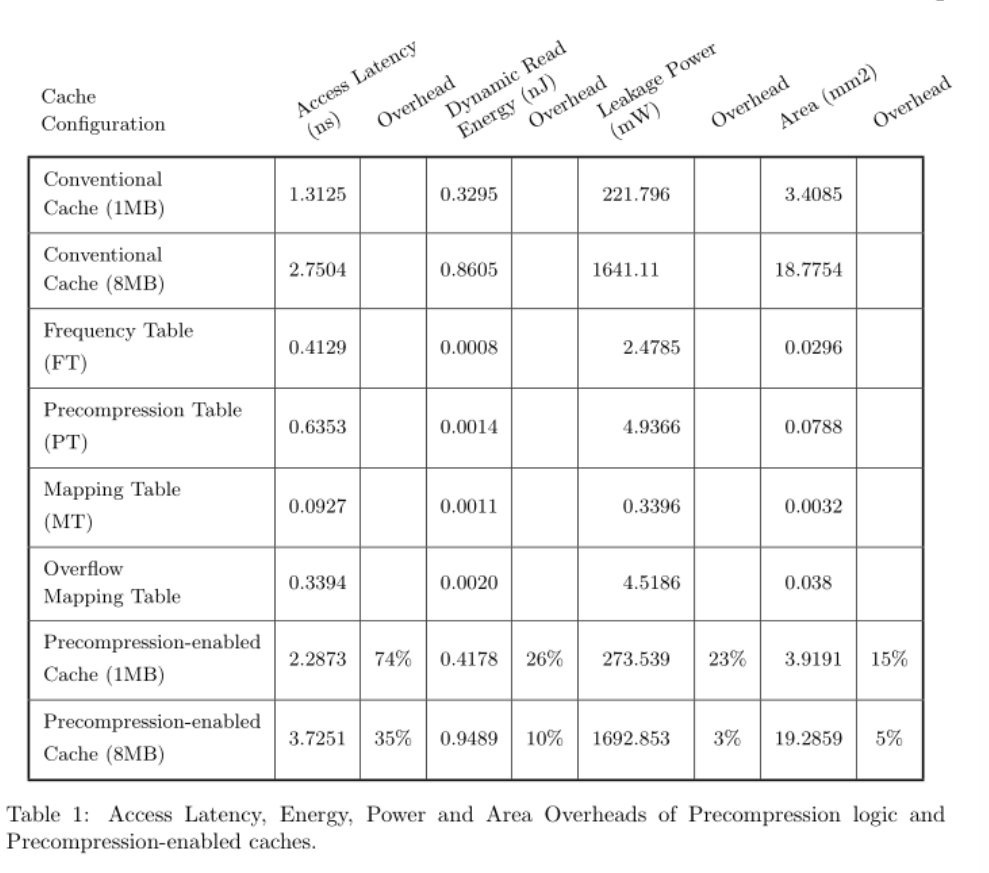
The table above comes from a recorded parsing example. The confidence values in the JSON excerpts below are illustrative, not measurements or an accuracy benchmark for this image.
Page and line confidence
Get confidence for an image
For an image of a page, call
/v3/text with document layout enabled:{
"src": "https://example.com/page.png",
"enable_document_layout": true,
"include_lines_json": true
}
Read
page_confidence at the response’s top level, or the identical object at lines_json.page_confidence. Each entry in lines_json.lines has its own confidence components:{
"page_confidence": {
"confidence": 0.79,
"text_confidence": 0.95,
"layout_confidence": 0.79,
"method": "prototype_min_v1"
},
"lines_json": {
"image_id": "request-image-id",
"page": 1,
"page_confidence": {
"confidence": 0.79,
"text_confidence": 0.95,
"layout_confidence": 0.79,
"method": "prototype_min_v1"
},
"parse_status": "parsed",
"fallback_count": 0,
"lines": [
{
"id": "heading-1",
"type": "text",
"text": "Results",
"confidence": 0.95,
"text_confidence": 0.95,
"layout_confidence": 0.96
},
{
"id": "table-1",
"type": "table",
"confidence": 0.79,
"text_confidence": null,
"layout_confidence": 0.79,
"parse_status": "parsed"
}
]
}
}
For text-bearing lines, the combined value accounts for both recognition and layout evidence. Non-text regions and structural parents have
text_confidence: null; their child text lines carry OCR evidence separately. Missing required evidence produces confidence: null, not an invented zero or one.PDF and files API: one summary per page
For
/v3/pdf, download GET /v3/pdf/{pdf_id}.lines.json after processing completes. For a PDF processed through the files API, read its lines.json output file, also downloadable through GET /files/v1/{pdf_id}.lines.json. Each entry in pages has the same structure as image lines_json:{
"pages": [
{
"image_id": "document-id-1",
"page": 1,
"page_confidence": {
"confidence": 0.79,
"text_confidence": 0.95,
"layout_confidence": 0.79,
"method": "prototype_min_v1"
},
"lines": [
{
"id": "heading-1",
"type": "text",
"text": "Results",
"confidence": 0.95,
"text_confidence": 0.95,
"layout_confidence": 0.96
}
]
}
]
}
pages[i].page_confidence describes that page, not the entire PDF. The example is an excerpt of the output artifact, not the asynchronous job-status response.What the prototype values mean
The initial
prototype_min_v1 method provides provisional reliability estimates, not validated probabilities of correctness. A value of 0.79 does not mean the page has a 79% chance of being error-free.The combined estimate takes the minimum of its required text and layout components. Text confidence reuses the existing OCR confidence. Layout uses a model-matched calibrated estimate when available, otherwise raw model evidence as a provisional proxy. The page text component uses the least-confident text-bearing leaf and stays unknown if any required leaf lacks evidence. Page layout includes root and nested parsing passes, rather than averaging the displayed lines.
This summary can help prioritize review, but it does not guarantee detection of missing content, repeated lines, or incorrect reading order. A page of confidently recognized text can still have structural errors. Check
parse_status, inspect uncertain components, and evaluate thresholds on your own documents. An empty page with no confidence evidence reports null values.Migrating integrations: shared
lines_json no longer emits layout_score at either page or region level. In this document, confidence now combines layout and text; use text_confidence for the previous OCR-only meaning. Legacy image line_data, word confidence, top-level image OCR confidence, and confidence_rate keep their existing meanings.Preserve tables with invalid structure
When document parsing cannot produce a valid table structure, it uses image fallback by default, with no new request option. On successful image delivery, the affected region remains visible as a source crop instead of extracted cells. Neighboring successfully parsed content remains editable. Prototype confidence values do not activate score-based fallback; that requires a separately validated policy.
The source crop below was produced by a controlled failure-path demonstration, not an observed model failure on this table. An empty table subtree was supplied to the formatter pipeline and its crop written through the filesystem output path. The following excerpt illustrates that outcome using the new confidence schema; it is not the original captured payload:
{
"id": "table-demo",
"type": "table",
"text": "",
"text_display": "",
"confidence": 0.0,
"text_confidence": null,
"layout_confidence": 0.0,
"parse_status": "image_fallback",
"fallback_reason": "invalid_structure"
}
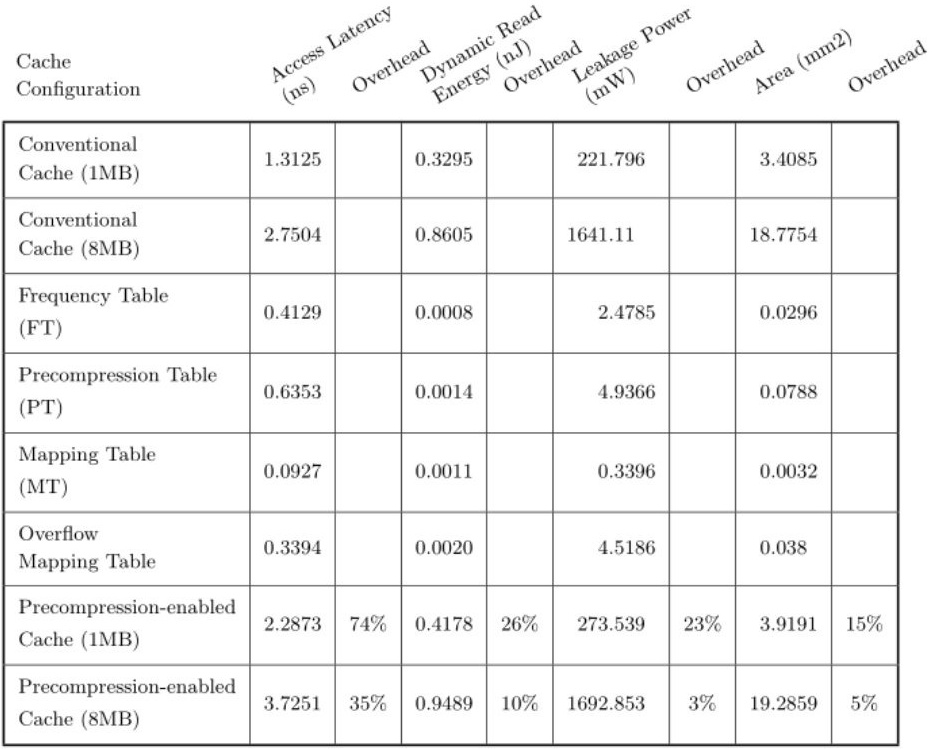
Zero here describes unsuccessful structured extraction, even though preserving the original pixels succeeded.
image_fallback means preservation succeeded; failed means it did not. Page parse_status and fallback_count summarize the outcome, and failed or image-fallback structured content lowers the page’s combined/layout confidence to zero. Use document processing for source-image preservation; this does not add hosted crop URLs to /v3/text.Image output defaults and payload size
lines_json is a JSON response field on /v3/text, not a value in the formats array. With enable_document_layout: true, it is included by default and the full-page layout model is selected. Ordinary image mode does not include this field by default. Set include_lines_json: true to request it in either mode; that option changes output only, not recognition mode. Existing line_data and include_line_data remain independent.The shared region document includes geometry, hierarchy, recognized content and confidence, so it can substantially enlarge responses for dense pages. If you only need text and the top-level
page_confidence, omit the region document explicitly:{
"src": "https://example.com/page.png",
"enable_document_layout": true,
"include_lines_json": false
}
Your integration can use the same region-processing logic for image
lines_json.lines and PDF/files pages[i].lines, while accounting for document-specific image references and page metadata.Form field selection detection
We added support for detecting the selected variants of the existing
checkbox and circle form_field subtypes. Selected fields render with the unicode symbols ⊠ and ⨀ in Mathpix Markdown and Markdown outputs. For example, in this content the selected option B is recognized as a selected checkbox and renders as ⊠, while the unselected options render as □: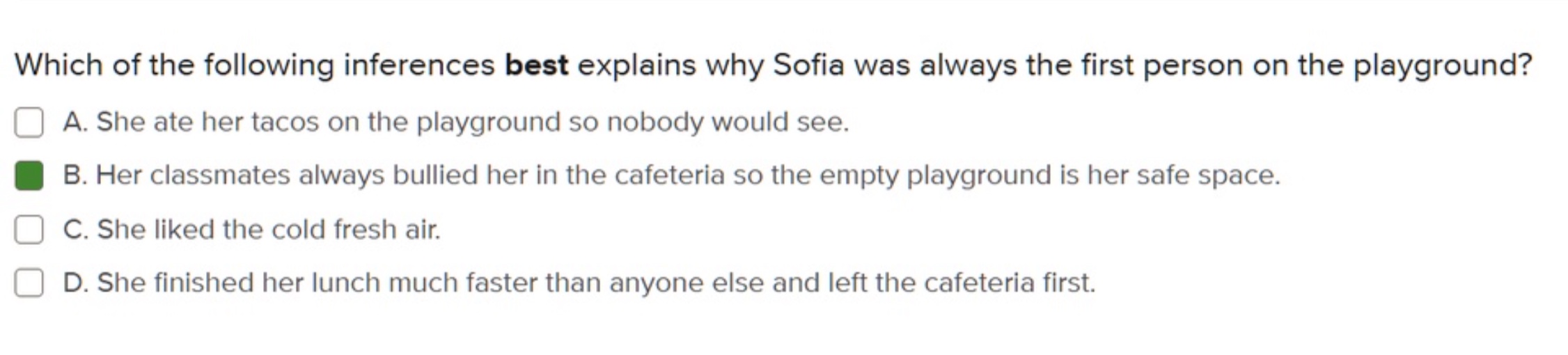
In the line-by-line JSON output (
line_data / .lines.json), these appear as the new selected_checkbox and selected_circle subtypes of the form_field type. Your integration can now easily tell which options on a form are filled in.List output control
The
disable_itemize option lets integrations choose plain list entries instead of structured \begin{itemize} / \item output:{
"disable_itemize": true
}
Each list entry keeps its printed marker inline. Lists inside table cells use line breaks instead of a nested itemize environment.