
Mathpix OCR API for STEM
Image & PDF digitizing software for STEM companies. Make creating and searching STEM content easy for your end users.
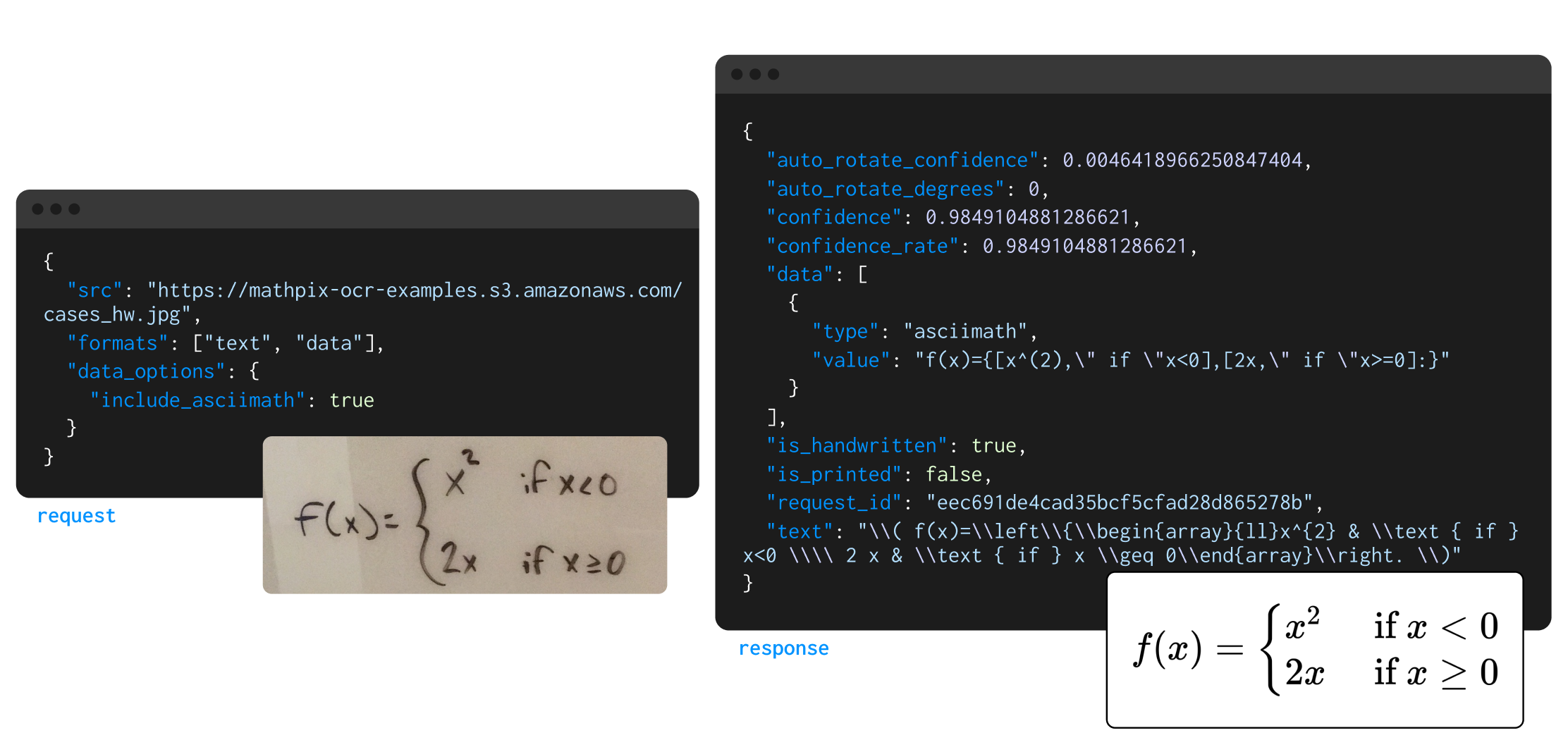
Math equations, chemical diagrams, tables and full PDF document conversion. Send PDFs, EPUB, DOCX, PPTX and images; get back LaTeX, AsciiMath, MathML, Markdown, HTML, DOCX, XLSX, PPTX and SMILES.
How fast the OCR API answers, and how often it is up
<0.5s
Median image response
Send an image, get LaTeX or Markdown back. Fast enough to sit inside a live user interaction.
5s
Per 20-page PDF
Every page runs in parallel, so a 500-page textbook still comes back in well under a minute.
200ms
Digital ink, recognized as you draw
Stylus strokes recognized in real time, for handwriting-first apps.
99.99%
Uptime
Elastic GPU capacity across multiple clouds. No queueing, no single point of failure.
Latency figures measured on live customer traffic, not a curated test set.
Capabilities
What the OCR API reads on a technical page
Built for documents that are technical in nature and full of structured data, the pages a general-purpose OCR engine flattens.

Read printed text and handwriting on the same page
v3/text reads printed, handwritten and mixed pages. v3/strokes takes handwriting as stroke coordinates, with no image to render first. Handwriting covers English, Hindi and the other Latin scripts.
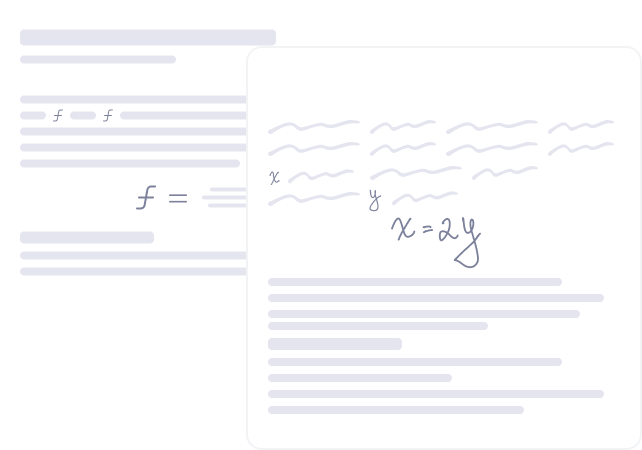
Get equations back as LaTeX, MathML or AsciiMath
Display equations, matrices and inline math inside running text, with the delimiters you choose via math_inline_delimiters.
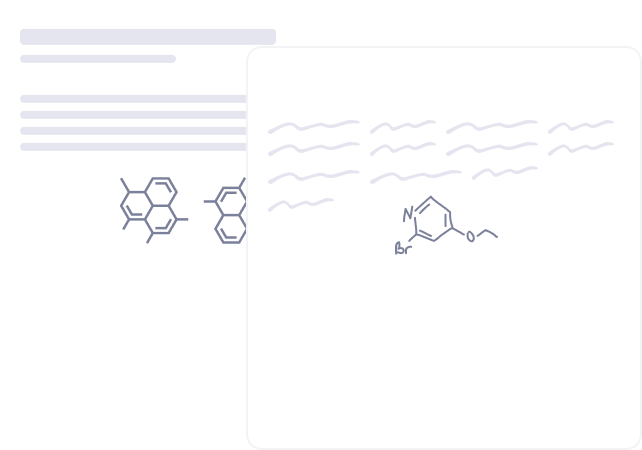
Turn printed and handwritten molecules into SMILES
Set include_smiles and chemical structures come back as canonical SMILES alongside the rest of the page.

Keep code blocks as code, not as prose
v3/pdf returns code as code blocks rather than reflowed paragraphs. For a full-page image on v3/text, set enable_document_layout; disable_lstlisting switches the output to Markdown fences.
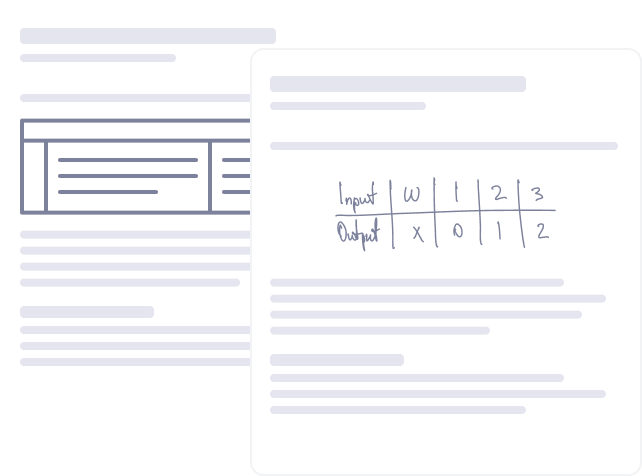
Extract tables with math inside the cells
Tables come back as Markdown, HTML or TSV, or as an XLSX workbook with one sheet per detected table.
What else the response carries
Each of these is either a request parameter you can set today or a structure the recognition model is explicitly trained on.
Two-column and multi-column pages come back in reading order
v3/pdf and the Files API apply document-layout recognition automatically. enable_document_layout is only needed when you post a full-page image straight to v3/text.
Algorithms and pseudocode blocks are recognised as such
Not reflowed into paragraphs: include_line_data returns code and pseudocode as line types, and algorithm and pseudocode as diagram subtypes.
Merged cells and multi-row headers keep their shape
Cells that span rows or columns come back tagged: include_line_data returns a table_cell type with the subtypes spanning and split.
Figure captions and footnotes, kept with what they belong to
Both are annotated structures in their own right rather than stray lines that happen to sit near a figure.
Per-line and per-word boxes, each with a confidence score
Set include_line_data or include_word_data on v3/text. Word-level data is v3/text only.
Rotated pages are corrected before recognition
On the image endpoints, controlled by auto_rotate_confidence_threshold. Rotation uses quarter turns or half turns (0, 90, -90 or 180 degrees), without arbitrary de-skewing.
Take only the pages you want, and drop the numbering you do not
On v3/pdf: page_ranges to select pages, include_page_breaks to keep the boundaries, remove_section_numbering to strip section numbers from headings.
Endpoints
All Mathpix OCR API Endpoints
v3/text - Process an Image
Our most widely used endpoint. OCR individual images of handwritten and printed equations, text, tables, and diagrams to get digital formats like LaTeX, AsciiMath, and MathML.
Developer Docs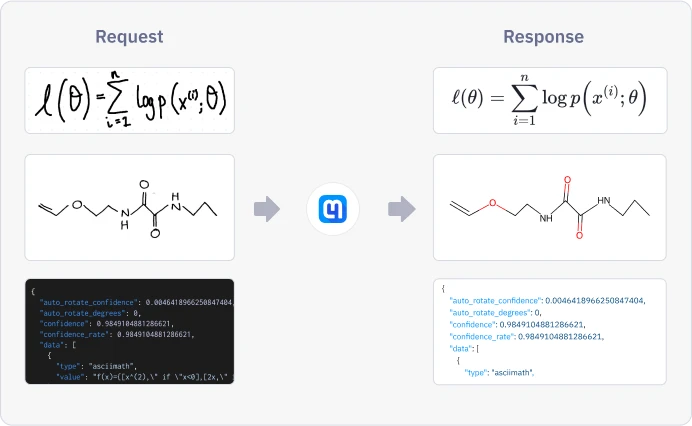
v3/pdf - Process a PDF
OCR PDFs and convert them to other formats. This endpoint works asynchronously since large PDF files can take several minutes to process. Accepts PDF files and URLs.
Developer Docs
v3/strokes - Digital Ink
Add stroke recognition (digital ink) to your app. Works for all math and for Hindi and Latin alphabet text. Supports live drawing capabilities via session IDs.
Developer Docsv3/batch - Batch Processing
Process multiple images in a single POST request. Returns a batch ID queried with a GET request once processing completes. Best for workflows that are not latency-sensitive.
Developer Docs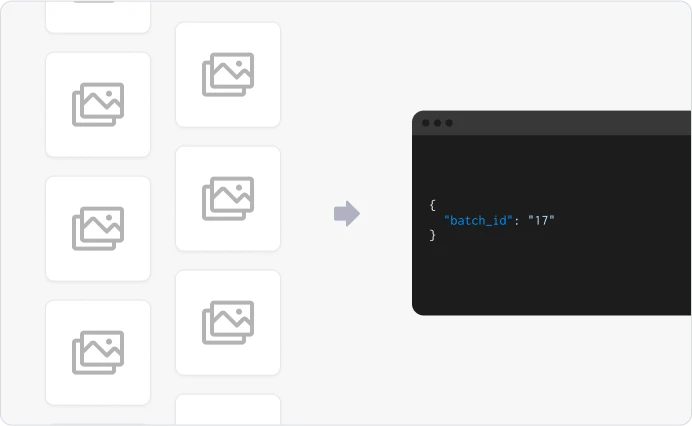
Your first OCR request, in three languages
Every sample below runs as written once you paste in your own keys, and the image is a public example, so there is nothing to upload first. Keys belong to an organization you create in the console, which needs billing set up before the keys activate - see API pricing for what that costs and the testing credit that comes with it.
cURL
curl -X POST https://api.mathpix.com/v3/text \
  -H 'app_id: APP_ID' \
  -H 'app_key: APP_KEY' \
  -H 'Content-Type: application/json' \
  --data '{
    "src": "https://mathpix-ocr-examples.s3.amazonaws.com/cases_hw.jpg",
    "math_inline_delimiters": ["$", "$"],
    "rm_spaces": true
  }'
Python
import requests, json
r = requests.post("https://api.mathpix.com/v3/text",
    json={"src": "https://mathpix-ocr-examples.s3.amazonaws.com/cases_hw.jpg",
          "math_inline_delimiters": ["$", "$"], "rm_spaces": True},
    headers={"app_id": "APP_ID", "app_key": "APP_KEY",
             "Content-Type": "application/json"})
print(json.dumps(r.json(), indent=2))
JavaScript
const response = await fetch("https://api.mathpix.com/v3/text", {
  method: "POST",
  headers: {
    app_id: "APP_ID",
    app_key: "APP_KEY",
    "Content-Type": "application/json",
  },
  body: JSON.stringify({
    src: "https://mathpix-ocr-examples.s3.amazonaws.com/cases_hw.jpg",
    math_inline_delimiters: ["$", "$"],
    rm_spaces: true,
  }),
})
console.log(await response.json())
A PDF is three calls: submit, poll, download
v3/pdf is asynchronous because a long document takes longer than a request should. You get an id immediately and collect the result when it is ready.
# 1. Submit. Returns {"pdf_id": "..."} straight away.
curl -X POST https://api.mathpix.com/v3/pdf \
  -H 'app_id: APP_ID' -H 'app_key: APP_KEY' \
  -H 'Content-Type: application/json' \
  --data '{
    "url": "https://cdn.mathpix.com/examples/cs229-notes1.pdf",
    "conversion_formats": {"docx": true}
  }'

# 2. Poll. Wait on status, not percent_done: percent_done reaches 100
#    while the output files are still being assembled. A conversion
#    format has its own gate, so wait for conversion_status.docx.status
#    to be completed as well.
curl https://api.mathpix.com/v3/pdf/PDF_ID \
  -H 'app_id: APP_ID' -H 'app_key: APP_KEY'

# 3. Download. Append the extension you asked for. -f makes curl fail
#    loudly rather than writing an error body into notes.docx.
curl -f https://api.mathpix.com/v3/pdf/PDF_ID.docx \
  -H 'app_id: APP_ID' -H 'app_key: APP_KEY' -o notes.docx
Formats and limits
Which files the OCR API accepts, and the limits that apply
Everything below is the enforced contract, not a roadmap. If your document is on this list, the API will take it today.
Documents you can send
POST v3/pdf
PDF, EPUB, Microsoft Word (DOCX, DOC), PowerPoint (PPTX), OpenDocument Text (ODT), DjVu, WordPerfect (WPD), Mobipocket (MOBI) and Amazon Kindle (AZW3).
Image formats we decode
POST v3/text, v3/latex
JPEG, PNG, BMP, JPEG 2000, WebP, TIFF, PBM, PGM, PPM, PNM, PFM, Sun raster, OpenEXR and Radiance HDR.
Mathpix Markdown
POST v3/converter
Send Mathpix Markdown and convert it without an OCR pass - the same conversion engine that runs on a scanned document.
What you get back
POST v3/pdf, v3/converter
Mathpix Markdown always. v3/pdf and v3/converter additionally convert to DOCX, LaTeX, HTML, Markdown, PDF, PPTX or XLSX, and Mathpix Markdown, Markdown, LaTeX and HTML are also available as a zip that carries the images. v3/pdf additionally returns line-by-line JSON with per-line geometry.
32 printed languages, and handwriting in English, Hindi and Latin scripts
Printed: English, French, Spanish, Portuguese, Italian, German, Vietnamese, Czech, Turkish, Hungarian, Danish, Dutch, Romanian, Polish, Croatian, Hindi, Korean, Chinese (Simplified and Traditional), Japanese, Thai, Tamil, Telugu, Malayalam, Gujarati, Bengali, Russian, Bulgarian, Serbian, Ukrainian, Belarusian, Arabic and Hebrew.
Handwriting: English, Hindi and the Latin-alphabet languages. Full breakdown by script on supported languages.
The limits that are actually enforced
v3/text, v3/latex and v3/batch JSON request body
5 MB
v3/strokes JSON request body
512 KB
v3/converter JSON request body
10 MB
v3/pdf file upload
1 GB
Image fetched from a URL (15 second timeout)
10 MB
Files API, per file
15 GB
Files API, files per job
200,000
Documents are encrypted in transit and at rest, and deleted on the schedule you set - see security for the detail. Monthly image and page quotas are set per app key and raised on request from the console. Full reference: supported formats and limits and quotas.
Pricing
What an OCR API call costs
Pay for what you process. No seat licences. A one-time, non-refundable $19.99 fee activates your first API key, and the rates below are the list prices everyone starts on.
$0.002 / image
Image OCR
v3/text - one image in, LaTeX, Markdown or MathML out. Images with more than 12 rows of text may be billed at the v3/pdf page rate.
$0.002 / request
Digital ink, recognized as you draw
v3/strokes - stroke coordinates recognized as they are drawn.
$0.005 / page
Documents you can send
v3/pdf - billed per page, whatever the output format.
$0.0015 / page
Bulk, into your bucket
Files API - results written to storage you own.
Volume tiers cut these above 1M units (30M for the Files API), and session-billed digital ink is priced separately. Full table, calculator and enterprise terms on API pricing.
Teams building on the Mathpix OCR API






I don’t trust the LLM to handle math but I trust Mathpix to do it.
Features
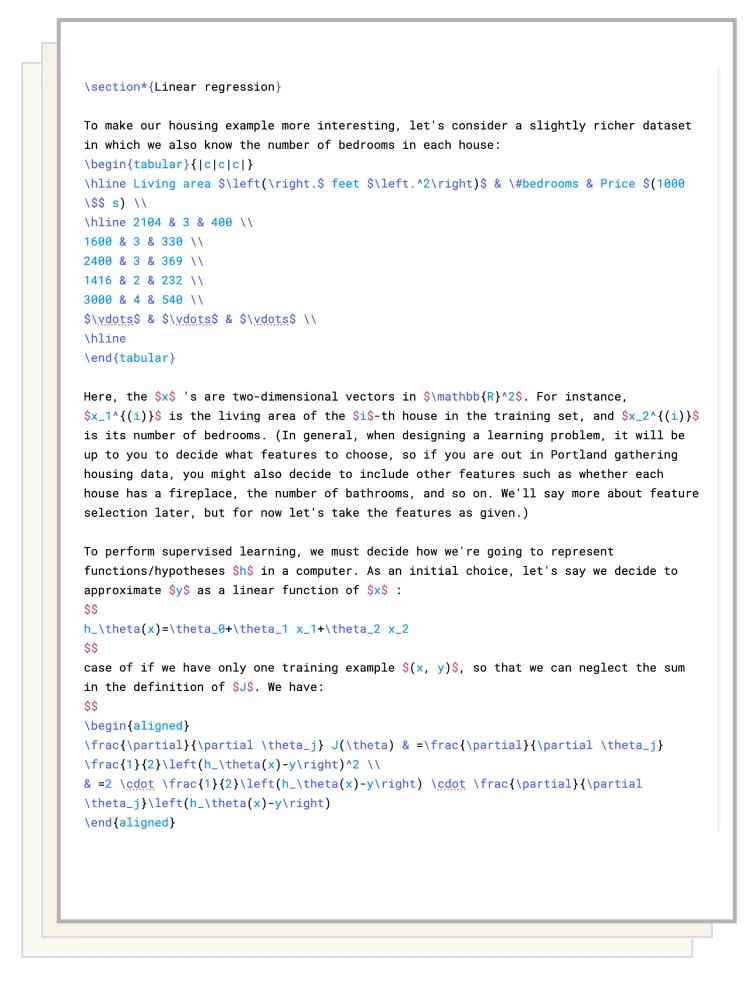
Digitize an entire PDF, not a page at a time
PDFs are first converted into Mathpix Markdown, then exported to DOCX, XLSX, LaTeX, and PDF. Text, diagrams, equations, and tables are extracted from the PDF.
Read the PDF API Docs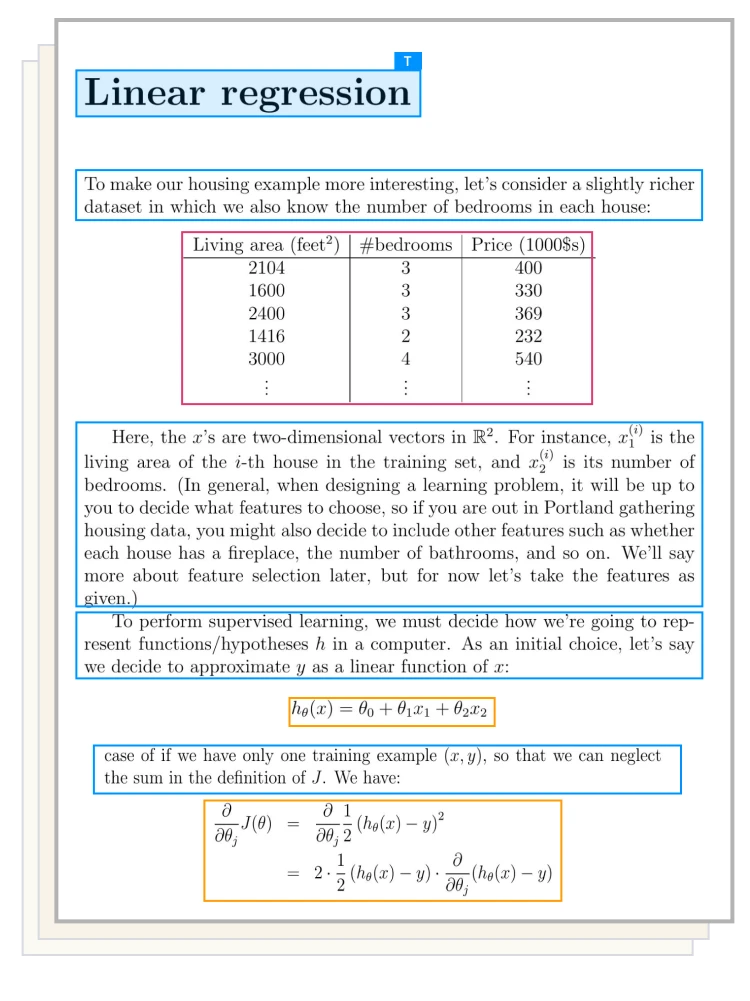
Original PDF
›
Extracted Mathpix Markdown
›
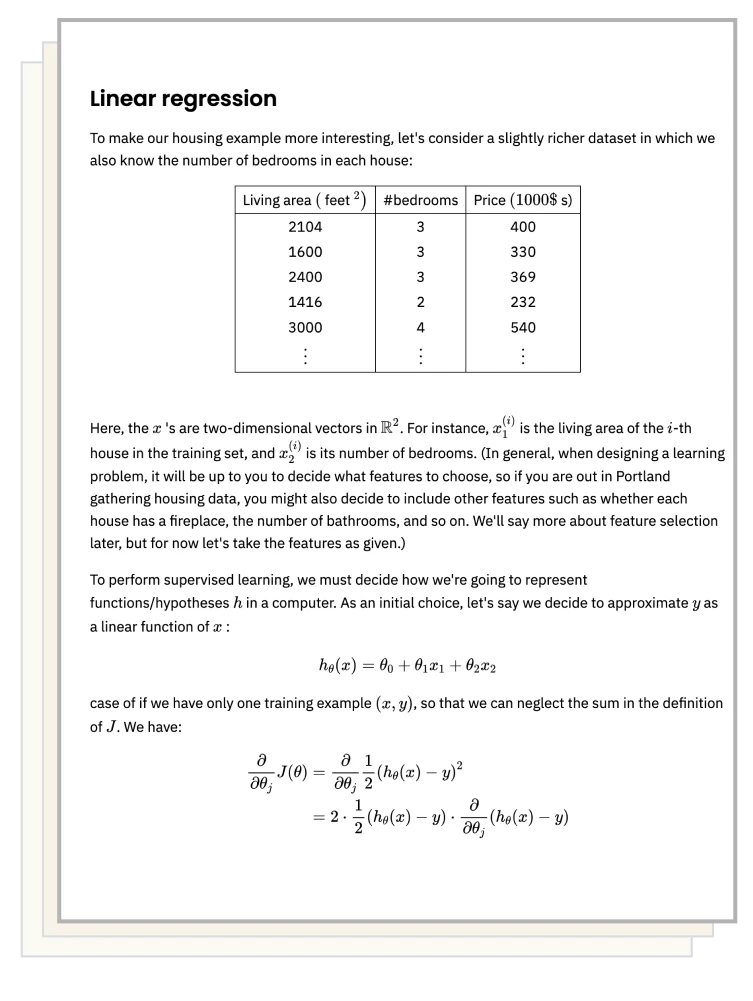
Rendered Result
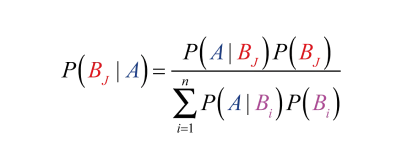
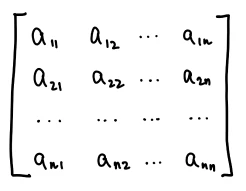
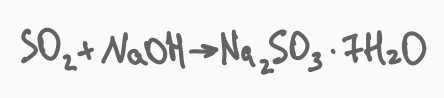
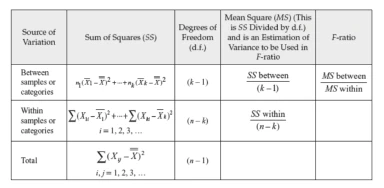
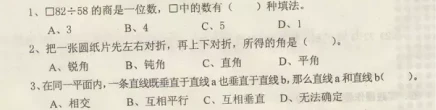
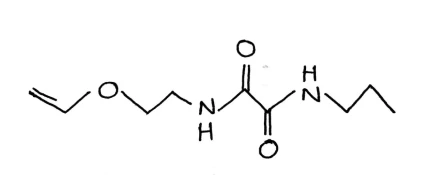
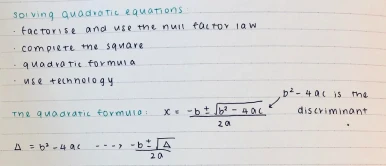
See it read equations, tables, chemistry and handwriting
Use Mathpix OCR API to accurately convert images of simple and complicated printed and handwritten math, text, tables, and chemical diagrams. We read 32 printed languages, and handwriting in English, Hindi and the Latin-alphabet languages.

Use Cases
Use Cases for Mathpix OCR API
Solving and search apps, on the long tail of math
Solving, tutoring and search apps use Mathpix OCR API for its long tail of advanced math, handwriting and foreign-language coverage.
Grading platforms, reading student handwriting
Grading and assessment platforms use Mathpix OCR API to make it faster and easier for professors to distribute and grade homework and exams with AI.
Publishers making STEM content accessible
Publishing companies use Mathpix OCR API to create digital STEM educational material. Accessibility companies use Mathpix to make science content accessible to all students.
Digitizing a library of PDFs at once
Our APIs are useful for bulk digitization of images or PDFs. We also offer on-premise and secure conversion solutions.
Questions
What developers ask before they integrate
Can it read handwriting, or only printed text?
Both, and on the same page. Handwriting recognition covers English, Hindi and the Latin-alphabet languages, through v3/text for images and v3/strokes for stylus input.
Do I have to upload my documents to Mathpix?
For a single document, v3/pdf takes either a URL or a file upload - your choice. For bulk work the Files API reads and writes your own S3, Azure Blob or GCS bucket, and the grant is keyless by default: you give a Mathpix identity scoped access through IAM, an AD app or service-account impersonation, and no secrets are uploaded to us. The documents themselves are still fetched and processed by Mathpix either way; what stays on your side are the credentials and the stored results.
What happens when I hit my monthly limit?
The API returns HTTP 429 with the error id http_max_requests, naming the limit, its value and your current count. Image and page limits are set per app key and raised on request from the console.
Does bulk processing eat the same page quota as v3/pdf?
Yes, and it is worth planning around. page_monthly_limit is shared between v3/pdf and the Files API, so a large batch job can exhaust the month and leave subsequent v3/pdf calls returning 429 until your next billing period.
Can I stop it guessing at the wrong alphabet?
Yes. alphabets_allowed is a suppression map: every alphabet is allowed by default, so you switch off the ones you do not expect - {"alphabets_allowed": {"ru": false, "hi": false}}. Setting a key to true does nothing. It is the usual fix when a stray character from another alphabet appears in otherwise clean English output, and it is accepted on v3/text, v3/latex, v3/batch, v3/pdf and the Files API.
Can I run this inside my own infrastructure?
Yes. There is an on-premise deployment for documents that cannot leave your network, and a secure conversion service for bulk work under stricter handling terms.
Ready to Get Started?
Pay-as-you-go plans require a credit or debit card. Enterprise payment options available on request.