
We’re pleased to announce SuperNet-200, our new OCR model. It adds new recognition capabilities, fixes several failure modes, and provides more robust page parsing.
What changes for your integration, at a glance:
v3/pdfand the Files API — every improvement below applies automatically, including the new nested-list (\begin{itemize}) and pseudocode (\begin{lstlisting}) outputs.- Snip — screenshots get the full document-layout treatment automatically.
- Direct
v3/textimage requests — recognition improvements and the new pseudocodelstlistingoutput apply by default, but nested-list and document-structure output does not: opt in withenable_document_layout: true. Without it,v3/textkeeps its snippet-oriented output shape. - Not ready for
lstlisting? Passdisable_lstlisting: trueto get standard fenced code blocks on any endpoint (details in the pseudocode section below).
Support for nested lists
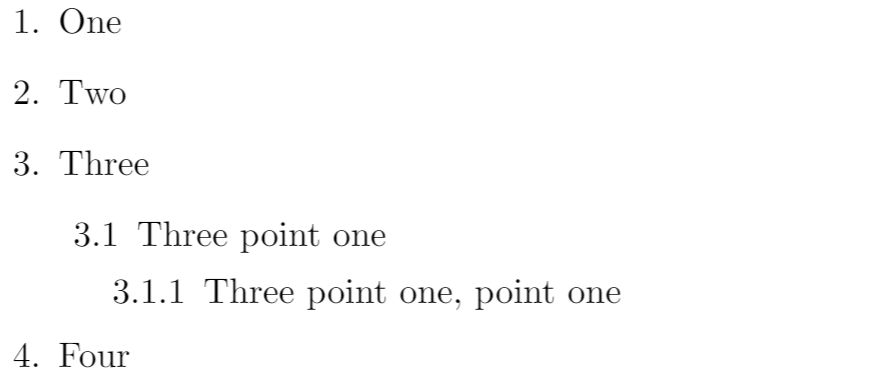
We’ve added support for recognizing deeply nested and indented lists. For example, this content:
Customers using our MMD format get output via
\begin{itemize} ... \end{itemize} environments:\begin{itemize}
\item[1.] One
\item[2.] Two
\item[3.] Three
\begin{itemize}
\item[3.1] Three point one
\begin{itemize}
\item[3.1.1] Three point one, point one
\end{itemize}
\end{itemize}
\item[4.] Four
\end{itemize}
The printed list marker (
•, -, 1., …) is preserved exactly as it appears on the page, emitted in the \item[<marker>] slot so the rendered marker matches the source document.Customers who prefer vanilla Markdown — the
Snip — get standard Markdown output. Nesting is expressed with indentation, and the printed
markers are preserved exactly as they appear on the page (so hierarchical markers like
come through literally rather than being renumbered):
md conversion format, or Markdown export inSnip — get standard Markdown output. Nesting is expressed with indentation, and the printed
markers are preserved exactly as they appear on the page (so hierarchical markers like
3.1come through literally rather than being renumbered):
1. One
2. Two
3. Three
    3.1 Three point one
        3.1.1 Three point one, point one
4. Four
Both outputs are emitted by default. Nested lists are also recognized inside table cells.
Nested-list recognition applies wherever document layout is enabled: PDFs, Files API
documents, and Snip screenshots get it automatically; on direct
pass
API documentation) — without it,
snippet-oriented output.
documents, and Snip screenshots get it automatically; on direct
v3/text image requests,pass
enable_document_layout: true in the request options (see theAPI documentation) — without it,
v3/text keeps its existingsnippet-oriented output.
Support for pseudocode environments
We now support the
\begin{lstlisting} environment for pseudocode. Supported in both MMD and LaTeX, it enables rendering of math elements inside algorithm pseudocode. For example, this content: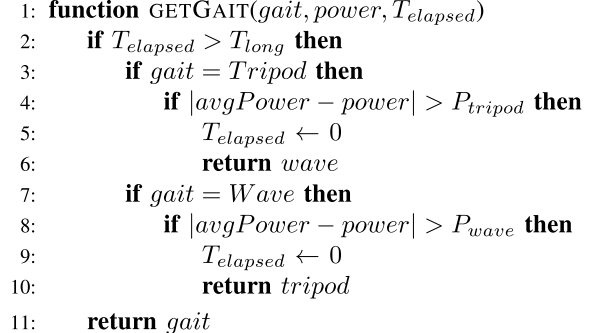
yields this output:
\begin{lstlisting}[mathescape=true]
function GETGAIT(gait, power, \(T_{\text {elapsed }}\) )
    if \(T_{\text {elapsed }}>T_{\text {long }}\) then
        if gait = Tripod then
            if \(\mid\) avgPower - power \(\mid>P_{\text {tripod }}\) then
                \(T_{\text {elapsed }} \leftarrow 0\)
                return wave
        if gait = Wave then
            if \(\mid\) avgPower - power \(\mid>P_{\text {wave }}\) then
                \(T_{\text {elapsed }} \leftarrow 0\)
                return tripod
    return gait
\end{lstlisting}
which renders as follows with mathpix-markdown-it:
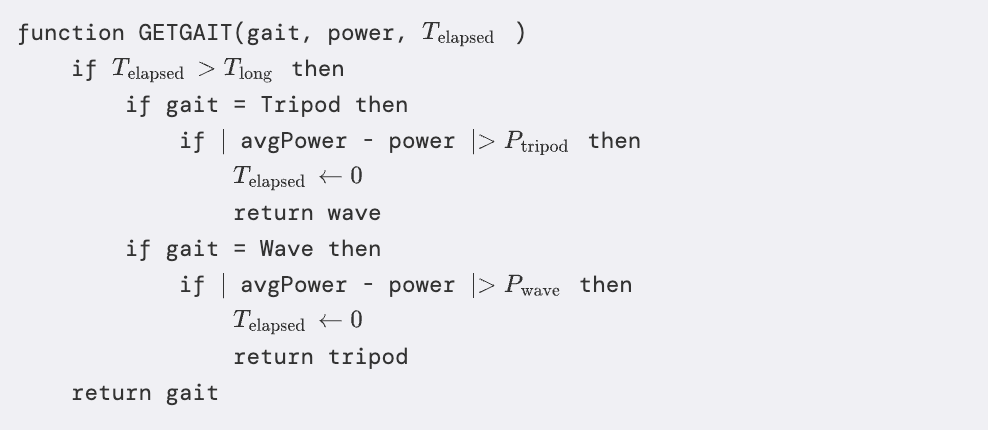
In LaTeX exports (
tex.zip), this becomes a genuine listings environment; in vanilla MD conversion it lowers to a standard fenced code block.lstlisting output is emitted by default. If your pipeline is not ready for it, you can pass disable_lstlisting: true in the request options; code and pseudocode content is then emitted as a standard Markdown triple-backtick fenced code block, which renders in any Markdown pipeline. Note that math inside a fenced block appears as plain text (e.g. \(T_{\text{elapsed}}\)) rather than being typeset — that’s the limitation lstlisting exists to fix.Rendering MMD yourself? If you render our MMD output in your own application using the mathpix-markdown-it npm package,
lstlisting support requires version 2.0.29 or newer — we recommend upgrading to 3.0.0 (see its migration notes regarding the new mathDelimiterMode option). Older versions will not render lstlisting blocks. List (itemize) output renders correctly on all versions from the last several years. Customers using our built-in conversion formats (md, docx, tex.zip, html, pptx) are unaffected — conversions are produced server-side.Support for QR code detection
QR codes are now identified and returned as cropped images, addressing a failure mode where they were previously misinterpreted as Chinese characters. Each detected QR code is also labeled in the line-by-line JSON output (
line_data / .lines.json) as type: "page_info" with subtype: "qr_code", alongside its bounding box, so you can locate and handle QR regions programmatically:{
"type": "page_info",
"subtype": "qr_code",
"region": { "top_left_x": 1960, "top_left_y": 1129, "width": 554, "height": 554 }
}
Support for Excel (xlsx) output
You can now export converted documents to Excel (
xlsx) format — ideal for pulling tables straight out of PDFs and images into spreadsheets. Each detected table becomes its own sheet (tabular content only). Request it like any other conversion format by adding xlsx to conversion_formats (or formats on v3/converter).Other improvements
- Support for the Malayalam language.
- Dramatically reduced hallucinations in text content containing emojis. For now, emojis are simply skipped in the response.
- We now distinguish line numbers from other page info content. Line numbers remain searchable, but are excluded from the MMD content, even when
include_page_infois used. - Ended support for the
include_diagram_textoption. - Tables no longer return results in the
latex_styledformat. Table content is only parsed with\begin{tabular}syntax (as opposed to\begin{array}). - Table cell content now aligns to the top of its row. In MMD outputs this appears as
\begin{tabular}[t]. Previously, in rows with cells of differing heights, content in shorter cells could appear vertically centered.